Rovio has updated its Angry Birds Rio, bumping it to version 2.0, and introduced a number of new features and improvements to the game.
The new update is live in the App Store and is based on the sequel of the Rio movie that was released a few years back, known as the High Dive episode and exciting new levels to the game.
The latest update comes with 20 challenging new levels to test your skills, along with 6 bonus levels on Brazilian shores. In addition, the update also brings new moves and improved graphics for the Rio 2 chapter. Here’s a complete change log for the game:
Make a BIG splash in the High Dive episode – based on the new blockbuster movie sequel Rio 2!
NEW LEVELS! 20 levels and 6 bonus levels set in a Brazilian port harbor!
RIO NEVER LOOKED SO GOOD! Totally refreshed with shiny new graphics for the Rio 2 chapter!
AMAZON RIVER DOLPHINS! These beautiful animals are accidentally trapped and they need your help!
NEW MOVE! Dive below to break open those cages from underwater!
If you’re an Angry Birds Rio user, head over to the App Store or the Google Play Store and grab the game.
Google has today opened the doors on its official Google Chromecast forums allowing the Chromecast community to post their views, tips and suggestions and allowing anyone else who might be interested in purchasing a Google Chromecast device more information.
Together with the ability to access plenty of information about the features of the new Google Chromecast device, as well as a detailed FAQ section.
As soon as you visit the new Google Chromecast public forums the front page has a quick link to twelve of the most frequently asked Chromecast questions according to Google. Providing answers for new adopters and providing more details on how they can benefit from purchasing a Google Chromecast device.
As with any forum there are quick search facilities as well as a variety of different ways to filter and list the threads that are available within the forum database to meet your needs.
Together with links to general content about setting up your Google Chromecast dongle as well as additional information on the current smartphone and tablet applications available to be used with Chromecast. Jump over to the Google Chromecast forums now to get started.
After Samsung unveiled their new Samsung Galaxy Camera 2 during the CES 2014Consumer Electronics Show in Las Vegas at the beginning of this year. Samsung has today officially announced the launch of their highly anticipated Samsung Galaxy Camera 2 will take place next month in March 2014 and the newly updated camera will be priced at $450.
Samsung have equipped their new Galaxy Camera 2 with a 16.3 megapixel sensor with BSI, a 21x optical zoom, with a 23mm wide angle lens, all run by Google’s Android 4.3 Jelly Bean operating system.
The Samsung Galaxy Camera 2 is powered by a quad core 1.6GHz processor supported by 2GB of RAM and its equipped with a 4.8 inch HD Super Clear Touch LCD display on the rear. As well as 8GB of built in storage and a microSD card slot which supports up to 64GB cards for further expansion when required.
Samsung have also included NFC, WiFi, GPS with GLONASS, Bluetooth 4.0 connectivity and optical image stabilisation, with power from a 2,000 mAh battery. Simon Stanford, Vice President of IM division, Samsung Electronics UK and Ireland, said during this years CES event :
“Consumers love the Galaxy Camera and this next-generation version is designed to improve on the successful predecessor, with upgraded and new features that will enhance the photography experience. The result is a more powerful and portable device, which continues to embrace the public’s passion for the social features of smartphones, yet also provides superior image control and quality. We are dedicated to making it easier for more people to achieve great results and with the Galaxy Camera 2′s host of creative features, anyone can capture standout images.”
Other features of the Samsung Galaxy Camera 2 include a built-in pop up Xenon flash, plus a range of Google and Samsung applications tom choose from, which include S Voice, Samsung Link, Samsung ChatOn and more. For more information on the new Samsung Galaxy Camera 2 jump over to the Samsung website for details.
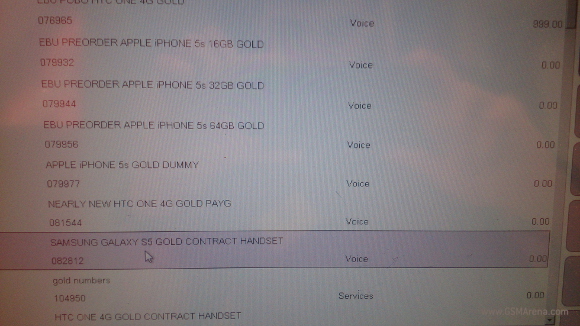
Much has been said and speculated about the Galaxy S5′s hardware, but one thing that hasn’t been discussed in the color options the upcoming flagship will be available in. Well, for those that like some bling on their smartphones, it looks like Samsung will be offering a gold color version of the Galaxy S5. A leaked Vodafone document has confirmed that a gold S5 will be launched at some point – considering it is already listed in a carrier’s database, it’s likely we’ll see the gold option made available right at launch, instead of months later as was the case with the gold Galaxy S4.
If the gold Galaxy S5 is launched at the same time as its non-gold counterparts, parallels will naturally be drawn to Apple’s iPhone 5s, which was also launched with a gold paint job right from the beginning. Add to that the fact that the S5 is also suspected to be powered by a 64-bit processor and sport a fingerprint sensor, and it seems like Samsung will be leaving no stone unturned in making sure that its next flagship offers all that its biggest competitor offers to its consumers, while trumping it through features like a feature-packed 16-megapixel camera and a QHD (2K) display.
Android's market share increased significantly during the third quarter of 2012, with the Google OS powering 72.4% of all smartphones sold in the three months' period. Apple's iOS came a very distant second with a market share of 13.9%.
This is an impressive accomplishment for Google's mobile OS, considering Android's market share was 52.5% in Q3 of 2011.
Samsung saw its position as the leading mobile manufacturer increase to 22.9% after selling almost 100 million phones in the three month period ending in September. This was mostly at the expense of Nokia, which saw its market share slide almost 5 percent points year-over-year.
The holiday season should see Apple take back some of both of those pies, as many iOS-faithfuls held off on replacing their smartphones until the iPhone 5 came around. Apple's new smartphone top dog is expanding its availability to many new markets in Q4, which should help Apple arrest the fall in iOS market share.
So, it's all but settled that Windows Phone 8 is the biggest thing to happen to smartphones this year. But are the handful of flagships carrying it the best thing that could happen to users?
Properly powered and engineered to perfection, the Nokia, Samsung and HTC WP8 smartphones are all making a bid to break iOS and Android's grip on the market. They are all fine species of smartphone. With the same screen resolution and chipsets powering them, with the Redmond-mandated hardware specs, they all have Microsoft written all over.
But then, it's only the Taiwanese that actually have it in writing. There's only one Windows Phone 8X - and it's the HTC Windows Phone flagship. Not a bad way to start now, is it? It must be quite a lift for the HTC Windows Phone 8X to feel special among clearly superior rivals. While Nokia and Samsung gave their WP top dogs those massive screens, HTC went for a relatively modest 4.3" LCD.
HTC Windows Phone 8X official photos
On one hand, it sounds like a smart move. The HTC Windows Phone 8X will be the only option for those looking for a more compact premium device that carries Microsoft's latest mobile platform. On the other, this could see the 8X relegated to a lower tier and made to fight it out with the likes of the Lumia 820. Now, that would call for some aggressive pricing and lower profit margins perhaps, which isn't exactly ideal for a company that hasn't had the best of streaks lately.
We'll see if the gamble pays off but there's no rush. Let's see what the HTC Windows Phone 8X is made of, and what could've been better.
Key features
Quad-band GSM/GPRS/EDGE support
Quad-band 3G with 42 Mbps HSDPA and 5.7 Mbps HSUPA support
4.3" 16M-color S-LCD2 capacitive touchscreen of 720 x 1280 pixel resolution
Scratch resistant Gorilla Glass 2 display
8 megapixel autofocus camera with LED flash, 1080p@30fps video recording
Impressively deep and coherent SNS integration throughout the interface
Xbox Live integration and Xbox management
Data Sense
Class-leading JavaScript performance
NFC support
HTC exclusive apps
Beats audio enhancements
Main disadvantages
Too much bezel offsets smaller screen
No microSD card slot, just one storage option
Non user-replaceable battery
App catalog falls short of Android and iOS
Competition has quad-core Krait CPUs already
No FM radio
No system-wide file manager
No voice-guided navigation
No music player equalizers
No lockscreen shortcuts
It's not a short list of disadvantages by any means, but most of those are platform-specific and, judging by the reception Windows Phone 8 has been getting, they're not deal-breakers. At least not all of them. Now, the non-expandable storage and the single 16GB option is something to definitely consider, but if you can live with that, the HTC Windows Phone 8X is a must-see.
The HTC Windows Phone 8X at ours
The Beats audio label has finally been made to count as the HTC Windows Phone 8X offers a specially designed amplifier, while the wide selection of available colors makes it easy to find a unit that best suits your personality. Whether you go for the businesslike black or one of those peppier paintjobs, the HD screen and beautiful unibody design are always part of the deal.
Windows Phone 8 is officially in the race. It probably isn't time to count the horses just yet but Team Windows seems ready to bounce - major OEMs have backed Microsoft up with flagships and mid-range options. Redmond is doing its part with what looks like one of the biggest OS overhauls this year.
It's not new looks that will impress users - the UI design has always been among the platform's strong points - but there are so many things under the hood that make the new OS such a decisive step forward. Windows Phone 8 supports multiple core chipsets and different screen resolutions. There's even deeper social integration, improved SkyDrive and Xbox Live support, DirectX graphics, Windows 8 and Xbox 360 cloud and services, USB mass storage.
The new platform core helps streamline app development and ties everything up in a consistent, cross-device ecosystem. What this means is the proverbial catching up with the Android and iOS app stores is finally within Microsoft's reach.
Key features:
Multi-core processor and multiple screen resolution support
Clean, uncluttered UI with distinctive design language
DirectX graphics support
Excellent MS Office mobile implementation
Top-notch social integration
Cloud services (SkyDrive, Windows Live, Xbox Live)
Wireless sync of multimedia content
Internal memory expandable via microSD card slot
USB Mass Storage mode
Multi-tasking
DivX/XviD video support
Nokia-powered Bing Maps
Children's corner
Data Sense
Class-leading JavaScript performance
NFC support
Bluetooth file transfers
Main disadvantages:
No system-wide file manager
No voice-guided navigation
No music player equalizers
No lockscreen shortcuts
Maximum supported resolution still lower than Android
Microsoft is spreading the campaign wide this time and failure is not an option. Windows 8 and Windows RT OS have already demonstrated huge potential. The Surface lineup looks promising and blurs the traditional boundaries between tablet and laptop. The recently launched Xbox Music service is something to look forward to as well. It is now Windows Phone 8's turn to show off its newly found skill and power.
User interface: keeping it simple
So, everyone is telling you Windows Phone 8 is way better than WP7, so different in fact, that it's impossible to run on old generation devices.
For starters, here's a very detailed walkthrough of the platform, courtesy of Joe Belfiore himself.
Yet, taking a look at the homescreen we see the familiar live tile Start Screen and the scrollable app list. Even most of the apps are the same as before. The first impression of Windows Phone 8 on those coming from 7.5 could be a little underwhelming. The user interface logic and looks are virtually the same. So, what's the big deal?
Sure, there are lots of new additions such as USB mass storage mode (so long, Zune transfers), the rich video codec support and the deeper Xbox Live integration. Even more important, there's support for new screen resolution modes, wider hardware support and DirectX graphics.
So, yes there's plenty of more power that users will definitely feel and appreciate. But the real benefit is long term. Windows Phone 8 shares code with the company's desktop OS and unified cross-platform development will hopefully soon start making a difference in terms of both the quantity and quality of apps .
Plenty of extra power under the hood, will open up many new possibilities for devs. DirectX graphics will support powerful new games and even give some classics a new lease on life on a phone.
But if you want to focus on the here and now, a video demo of Windows Phone 8 is a good place to start.
A push on the unlock button reveals the lock screen, which displays the current time and date and shows calendar events, emails and missed calls. A press on any of the volume keys will bring the volume switch and music controls on top of the screen.
What we would have liked to see here are some (preferably customizable shortcuts). As Windows Phone mandates handsets have a dedicated camera key you can always launch the camera, but what about phone, messaging or web browsing apps - you always need to unlock your homescreen for that to work.
Luckily Microsoft added at least one new feature for the lockscreen – the Live Apps service allows your Windows Phone 8 to be updated directly by the apps you choose (as long as they support it) – i.e. Facebook photos and updates can pop there or Skype notifications, you name it. We are yet to see how this works though since our Windows Phone 8 testing unit didn’t come with this feature.
Swiping the lockscreen up reveals the live-tile Modern user interface. It's a vertical grid of Live tiles, which can be reordered the way you like. Almost anything can be placed in the grid by tapping and holding down over an app and selecting the Pin to start option.
The lock screen • the home screen and main menu
Windows Phone 8 introduces resizable live tiles, an option that will also be available with the latest WP 7.8 update. When you tap and hold on a tile, the resize option is available along with unpin. You can choose between quarter, normal and double size.
Depending on which size you select you get different info displayed in the Tile. If you go for the smallest, you get nothing but a static icon, while the two larger sizes offer more info.
Resizing a tile
The homescreen looks exactly the same, except that the new tile sizes let you fit a lot more There is no wallpaper, you can just opt for a dark or light background. Whatever you choose it will be the base color for every system app on the phone.
The lock screen and the hidden settings
Each of the Live tiles displays relevant info such as the current date, pending calendar events, missed calls, unread emails and more (third party apps do it too). For instance, the Marketplace tile displays the number of updates available, while the Pictures tile is essentially a slideshow of your photos. It's nice to have all that info always available at-a-glance. You can look at them as homescreen widgets of sorts, but that's a bit oversimplifying.
WP8 offers multi-tasking as promised. It's not always true multitasking; most of the cases things are being done the iOS way. Apps not in the foreground are suspended, but the OS has ways to take over and carry out the task for them. But just like on iOS, if an app requires to run in the background (navigation clients, players, communicators, etc.) it can.
The multi-tasking interface
The multi-tasking interface is the same as in WP7 - to switch between apps you press and hold the Back key. You'll get thumbnail snapshots of the apps, ordered chronologically left to right.
You can scroll the list horizontally to select an app and a tap will bring you back to your running or suspended app. Usually, the last 8 apps are here. You can't "kill" any of those apps from here - to exit one you must bring it to front and use the Back key to close it.
Opening the settings menu displays two sets of options: like on the start screen, you can swipe between System and Applications. System covers all the settings you can think of like sounds, color theme, Wi-Fi, Bluetooth, Accounts, etc. The Application settings let you configure each app you have on the device.
Settings
Windows Phone 8 can also be operated with voice only through the TellMe - you can dictate, have the phone read out the reply, you can initiate searches and so on. It's what Android's got with Google Voice and Apple with Siri , but sadly the Windows virtual assistant though is still far behind either of those.
Microsoft TellMe
One of the new features brought by WP8 is the Children's corner. You can select the apps and types of content you want roped in and password-protected, so you can safely share your smartphone with your kids without worrying about them messing up with your settings or accessing inappropriate content. When activated, the Children's corner is accessible by a swipe to the left on the lockscreen. Without the password it's impossible to return to your standard lock or home screen.
Wait, did hell just freeze over? Maybe a couple of degrees cooler? Rumors of a mini version of the iPad had been laughed at, dodged and denied - not necessarily in that order and often all at once. But here it is - the iPad mini is finally a reality. It caused due measures of excitement and perhaps a bit of disappointment. Yet, in typical Apple fashion, it's an excellent piece of hardware. In short, it's a polarizing device that may as well be the next best-selling tablet.
Apple iPad mini official images
You have to hand it to Apple's R&D team - they know how to design hardware. The iPad mini is super thin and light, with a cool aluminum shell. Sure, they swore they'd never make a 7" tablet and the truth is they still haven't - the 7.9" screen of the mini offers 36% more real estate than the screens of the Google Nexus 7 and the Amazon Kindle Fire HD.
Less bezel on the left and right of the screen combined with the ~310g of weight make it reasonably comfortable to hold with one hand. Apple did make some compromises, which drew a lot of ire. Here's the summarized list of what's good and what's bad about the Apple iPad mini:
Dual-band Wi-Fi 802.11 a/b/g/n connectivity, carrier-dependent hotspot support
Optional 2G/3G GSM, CDMA, LTE connectivity (data only, separate models)
Optional GPS with A-GPS support (for the 3G model only)
Apple A5 SoC, dual-core Cortex-A9 @ 1GHz chipset
512MB of RAM
PowerVR SGX543MP2 dual-core GPU
iOS 6 with Siri, iCloud support and activation
16/32/64GB of inbuilt storage
Weight of 308 grams (312 grams for the Wi-Fi + Cellular option)
Bluetooth 4.0
16.3Wh battery
Accelerometer, compass and three-axis gyro-sensor
Compatible with every iPad and iPhone app without any modifications
The base version costs less than a SIM-free iPhone 4, only $30 more than iPod touch
5MP auto-focus camera
1080p video recording at 30fps
1.2MP secondary camera capable of FaceTime calls, 720p recording
Four and five-finger gestures
1080p TV-output with the Apple Digital AV Adapter (purchased separately for $49), 1080p video streaming
Supports magnetic cases
Lightning connector
Stereo loudspeakers
Main disadvantages
More expensive than 7" Android tablets, only $70 cheaper than iPad 2
No Retina display, 162ppi only
Same chipset as iPad 2, now two generations old
iTunes still required for most of the content uploads
Reflective screen struggles outdoors
No standard USB port, Lightning accessories still rare and expensive
No GPS receiver in the Wi-Fi version
No memory card slot
Lack of basic iOS apps - stocks, calculator, voice memos
The disadvantage list may seem longer than usual but most of the items there are general complaints that apply to virtually all Apple products, like the absence of a memory card slot. The way we see it, there are three main problems with the iPad mini - the (relatively) low-res screen, the old chipset and the price.
Apple products have so far effortlessly hit it big with users despite their perceived limitations compared to the competition. The new crop of iPads - the iPad 4 and iPad mini - already sold in the millions.
iPad mini in our office
The software - iOS 6 - should be very familiar to Apple users, but the hardware is new. It's not like the big iPads, which mostly varied in thickness, this one has been designed to comfortably hold in one hand and slip into a coat pocket.
Some analysts have gone as far as to say that the iPad mini will become the iPad - it's highly portable, capable enough and drawing on the vast resources of the Apple eco-system. And if you adjust for the "Apple tax", the mini isn't that expensive.
Final words
OK, then. Before we have our say on the iPad mini, we'll let the numbers talk. Three million tablets sold over the opening weekend easily beats the record set in March by the then new iPad. It's a combined figure of course for the two new slates - big and small - but it's quite likely for the iPad mini to claim responsibility for the better part of the traffic.
It's the novelty factor for one - a truly portable Apple tablet at long last against an iPad 4 that hardly brings anything new over the now discontinued iPad 3. No doubt, the mini is the new iPad, and it's not beyond belief that it may end up as the iPad of the future. Looking at the third and fourth generation of Cupertino slates, it's easier to imagine an iPad 5 with a Retina display in the mini form factor than another incremental upgrade.
On a second thought - would it have made sense to simply launch the iPad mini with a high-res screen and an A6 chipset instead of releasing another full-size slate just months after the previous model? From the perspective of iPad 3 owners, it most certainly would.
It's hard to guess what's on Apple's mind. At least a little pressure from cheap Google-powered tablets must have been felt. Or they may be simply encouraging users to have both sizes - one as a stay-at-home, the other for outings. That's more like Apple actually. They'd rather go on and on about portability and carefully avoid the subject of affordability.
Because, let's face it, the iPad mini is way more expensive than the likes of the Nexus 7 and the Kindle Fires. Whatever the stunts that allow Google and Amazon to charge less than $ 200.00 on their tablets, they at least have the decency of putting an HD screen.
At $199 for a 16 GB version the Nexus 7 is a steal but even a 32 GB variant will set you back much less than a baseline 16 GB iPad mini. On the other hand, a bigger 8.9" screen on the Kindle Fire HD is also cheaper than the cheapest iPad mini.
Asus Google Nexus 7 • Amazon Kindle Fire HD • Amazon Kindle Fire HD 8.9
In an ideal world, the iPad mini would've been out at least a year ago and competing against something like the Samsung Galaxy 7.7. But when it gets to tablets you wouldn't call it an ideal world unless you're... Apple. Yes, Cupertino has been calling the shots forever and we're at a point where for a tablet to sell it either has to be dirt cheap or sport a bitten apple at the back.
Samsung P6800 Galaxy Tab 7.7
So, there we are. The iPad mini is nothing more than an iPad 2 with a smaller screen and premium finish. The A5 chipset is two-generations old and the mini has fewer pixels on a bigger screen than the closest Android-powered rivals.
Yet, the iPad mini is the biggest thing to come from Apple this season - after an underwhelming iOS 6, after an iPhone 5 and an iPad 4 that are not exactly making the previous versions obsolete.
It's a beautiful device too, we'd go ahead and call it the best looking Apple tablet to date. But portability is by far its biggest asset. Enough probably to make millions of users buy the mini and keep their bigger iPad.
Not only because it can go wherever they go, it's for things like gaming too. Videos suck on the small, low-res, 4:3 screen; web and picture browsing, as well as reading, are a lot better on Retina. But playing games is where the iPad mini is at its best. The screen size is right in terms of how far your thumbs can reach and accelerometer control is a lot more sensible than on a full-size iPad. And we mean for more than a couple of minutes.
But does this make the iPad mini a niche device for gaming and commuters? The competition would certainly like to think so. But even they must realize it's too good to be true. We can take people who are committed to Apple in one way or another - an iPhone or an iPad, most likely both - out of the equation.
It's just become harder for the neutral user about to decide on their first ever tablet. And that alone is a win for Apple already. We're not saying it's fair. But the choice is really between sensible and fancy, cheaper and apple at the back.


.jpg)